
Next week's photo theme is fathers. I found a website that has a great gallery of father and child photos. Go check it out for a little inspiration before you start clicking this week.
Better Photo.com
I also thought this might be interesting. Here are some nostaligic father child photos from the 50s.
Life Classic pictures
have a wonderful father photo day- I mean father's day.
Showing posts with label tips and tutorials. Show all posts
Showing posts with label tips and tutorials. Show all posts
Saturday, June 9, 2007


Sunday, June 3, 2007
photo tips
1.Try framing your shot.
For this one, I backed up until the trees were in the shot and framing the top of the building.

2. Shoot at an angle for an artistic look.
This shot was also framed with trees.

3. Get down low.
Try getting low to get a new perspective! For this photo, I squatted way down so I could get below the flowers. I used the camera's landscape mode so everything would be in focus.

4. Look up.
For this shot, I stood at the base of the middle of the building and looked directly up. From this angle, it appears as if the spires on either side angle toward the middle.

Friday, June 1, 2007
tweaked

I played with this photo a little in Photoshop Elements 3.0
Here's how:
1. Use the magnetic lasso tool to select the rose.
2. Click on Select.
3. Click Inverse.
4. Click Enhance.
5. Click Adjust color.
6. click remove color from area surrounding the object (the rose).
7. click adjust hue/saturation.
8. click the box that says colorize.
9. Move the three manual controls until you find the desired hue, saturation and lightness.
10. click select.
11. click inverse.
12. click enhance.
13. click adjust color
14. click adjust hue/saturation
15. increase the saturation slightly to make the rose brighter.
16. click select
17. click deselect.
18. click file- save as-
this should work on anything with a defined shape like this. The magnetic tool is amazing! I would love to see your 'tweaked' photos!
Tuesday, May 22, 2007
Rule of Thirds
This week our photo challenge is the Rule of Thirds. I found a nice little tutorial about it at a website called Digital Photography School. Can't wait to see what you come up with!
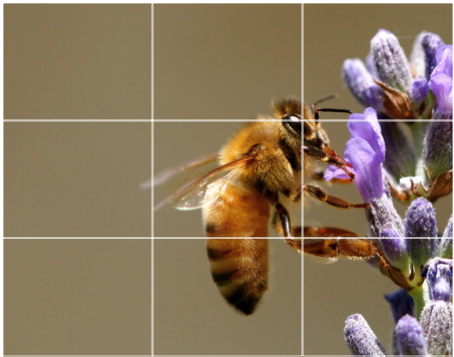
As you’re taking an image you would have done this in your mind through your viewfinder or in the LCD display that you use to frame your shot.
With this grid in mind you the ‘rule’ now identifies four important parts of the image that you should consider placing points of interest in as you frame your image.
Not only this - but it also gives you four ‘lines’ that are also useful positions for elements in your photo.
The theory is that if you place points of interest in the intersections or along the lines that your photo becomes more balanced and will enable a viewer of the image to interact with it more naturally. Studies have shown that when viewing images that people’s eyes usually go to one of the intersection points most naturally rather than the centre of the shot - using the rule of thirds works with this natural way of viewing an image rather than working against it.
In addition to the above picture of the bee where the bee’s eye becomes the point of focus here are some of examples:

In this image I’ve purposely placed the head of my subject on one of the intersecting points - especially his eyes which are a natural point of focus for a portrait. His tie and flower also take up a secondary point of interest.

Rule of Thirds
The basic principle behind the rule of thirds is to imagine breaking an image down into thirds (both horizontally and vertically) so that you have 9 parts. As follows.
The basic principle behind the rule of thirds is to imagine breaking an image down into thirds (both horizontally and vertically) so that you have 9 parts. As follows.
As you’re taking an image you would have done this in your mind through your viewfinder or in the LCD display that you use to frame your shot.
With this grid in mind you the ‘rule’ now identifies four important parts of the image that you should consider placing points of interest in as you frame your image.
Not only this - but it also gives you four ‘lines’ that are also useful positions for elements in your photo.
The theory is that if you place points of interest in the intersections or along the lines that your photo becomes more balanced and will enable a viewer of the image to interact with it more naturally. Studies have shown that when viewing images that people’s eyes usually go to one of the intersection points most naturally rather than the centre of the shot - using the rule of thirds works with this natural way of viewing an image rather than working against it.
In addition to the above picture of the bee where the bee’s eye becomes the point of focus here are some of examples:
In this image I’ve purposely placed the head of my subject on one of the intersecting points - especially his eyes which are a natural point of focus for a portrait. His tie and flower also take up a secondary point of interest.
In this shot I’ve placed the subject along a whole line which means she is considerably off centre and therefore creating an additional point of interest. Placing her right in the centre of the frame could have resulted in an ‘awkward’ shot.
 In a similar way a good technique for landscape shots is to position horizons along one of the horizontal lines also as I’ve done with the following shot (I’ll let you imagine the lines).
Using the Rule of Thirds comes naturally to some photographers but for many of us takes a little time and practice for it to become second nature.
In learning how to use the rule (and then to break it) the most important questions to be asking of yourself are:
What are the points of interest in this shot?
Where am I intentionally placing them?
Once again - remember that breaking the rule can result in some striking shots - so once you’ve learnt it experiment with purposely breaking it to see what you discover.
Lastly - keep the rule of thirds in mind as you edit your photos later on. Post production editing tools today have good tools for cropping and reframing images so that they fit within the rules. Experiment with some of your old shots to see what impact it might have on your photos.
In a similar way a good technique for landscape shots is to position horizons along one of the horizontal lines also as I’ve done with the following shot (I’ll let you imagine the lines).Using the Rule of Thirds comes naturally to some photographers but for many of us takes a little time and practice for it to become second nature.
In learning how to use the rule (and then to break it) the most important questions to be asking of yourself are:
What are the points of interest in this shot?
Where am I intentionally placing them?
Once again - remember that breaking the rule can result in some striking shots - so once you’ve learnt it experiment with purposely breaking it to see what you discover.
Lastly - keep the rule of thirds in mind as you edit your photos later on. Post production editing tools today have good tools for cropping and reframing images so that they fit within the rules. Experiment with some of your old shots to see what impact it might have on your photos.
Subscribe to:
Posts (Atom)